How do I switch my template to another provided by Blogger?
Switching templates in Blogger is easy... too easy:
Go to
Layout | Pick New Template:

and pick a new one:
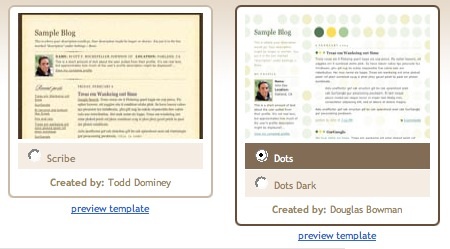
Finally, click the orange "Save Template" button.
Notes:
- Before switching to a new template, it's a good idea to back up your current one (if you've made changes to it). Go to the Layout | Edit HTML tab, and copy and paste the template code to a text file on your computer.
for better quality and more beautiful layout design you may
visit here my personal collection of blogger templates ! at
Blogger Dashboard you will find professional and premium blogger templates for free ! so be free to visit
my collection here :)
Once you've logged into Blogger you'll see your Dashboard, showing your list of blogs. Click the blue 'New Post' button to create a new post:

Next, you'll see the
Create New Post page. Start by giving your post a title (optional), then enter the post itself:

When you're done, click the "Preview" link to make sure it's ready to go:

Once you're satisfied with your post, click the "Publish" button. This will publish your new post:

Label: blogger tips
# diposting oleh Full Blogging Trick and Tips : Rabu, November 03, 2010
0 Komentar

Top 15 effective Tips to Increase Blog Traffic !
Every Blogger Should Read this tips to increase traffic !

Top amazing Tactics to Increase Blog Traffic
here are the best Simple Ways to Get Your Blog Noticed in the Blogosphere !
The blogosphere is a big and busy world with over 100 million blogs and growing. How do you attract visitors to your blog? Follow these simple tips to drive traffic to your blog.

1. Write Well and Write Often
Frequently updating your blog with useful content is the first step to building your blog's audience. The content you write is what will keep readers coming back for more. Make sure you have something meaningful to say to them and say it often to maintain their interest and keep them loyal.
Furthermore, post frequently to increase the number of chances you have for your blog's content to be noticed by search engines such as
Google or
Technorati.
2. Submit Your Blog to Search Engines
Get on the radar screen for the popular search engines such as Google and
Yahoo! by submitting your blog's URL to them. Most search engines provide a 'Submit' link (or something similar) to notify the search engine of your new blog, so those search engines will crawl it and include your pages in their results.
It's important to understand that simply submitting your blog to search engines doesn't mean your pages will appear at the top of a Google search results screen, but at least your blog will be included and will have the chance of being picked up by a search engine.
3. Use and Update Your Blogroll
By adding links to sites you like in your blogroll, the owners of those blogs will find your blog and will be likely to add a reciprocal link in their blogrolls. It's an easy way to get the link to your blog in front of many readers on other blogs. The hope is that some of those readers will click on the link to your blog on the other blogs' blogrolls and find your content interesting and enjoyable turning them into loyal readers.
4. Harness the Power of Comments
Commenting is a simple and essential tool to increase your blog's traffic. First, respond to comments left on your blog to show your readers that you value their opinions and draw them into a two-way conversation. This will increase reader loyalty.
Second, leave comments on other blogs to drive new traffic. Make sure you leave your blog's URL in your comment, so you create a link back to your own blog. Many people will read the comments left on a blog post. If they read a particularly interesting comment, they are highly likely to click on the link to visit the commentor's website. It's important to make sure you leave meaningful comments that are likely to invite people to click on your link to read more.
5. Syndicate Your Blog's Content with an RSS Feed
Setting up an RSS feed button on your blog makes it easy for your loyal readers to not just read your blog but also know when you publish new content.
6. Use Links and Trackbacks
Links are one of the most powerful parts of your blog. Not only are links noticed by search engines, but they also act as a tap on the shoulder to other bloggers who can easily identify who is linking to their sites. Linking helps to get you noticed by other bloggers who are likely to investigate the sites that are linking to them. This may lead them to become new readers of your blog or to add links to your blog from theirs.
You can take links to other blogs a step further by leaving a trackback on the other blog to let them know you've linked to them. Blogs that allow trackbacks will include a link back to your blog in the comments section of the post that you originally linked to. People do click on trackback links!
7. Tag Your Posts
It takes a few extra seconds to add tags to each of your blog posts, but it's worth the time in terms of the additional traffic tags can drive to your blog. Tags (like links) are easily noticed by search engines. They're also key to helping readers find your blog when they perform searches on popular blog search engines such as Technorati.
8. Submit Your Posts to Social Bookmarking Sites
Taking the time to submit your best posts to social bookmarking sites such as
Digg,
StumbleUpon,
Reddit and more can be a simple way to quickly boost traffic to your blog.
9. Remember Search Engine Optimization
When you write your blog posts and pages, remember to optimize your pages for search engines to find them. Include relevant keywords and links but don't overload your posts with too many relevant keywords or completely irrelevant keywords. Doing so can be considered spamming and could have negative results such as your blog being removed from Google's search entirely.
10. Don't Forget Images
Images don't just make your blog look pretty, they also help people find you in search engine listings. People often use the image search options offered by Google, Yahoo! and other search engines, and naming your images with search engine optimization in mind can easily boost your traffic.
The blogosphere is a big and busy world with over 100 million blogs and growing. How do you attract visitors to your blog? Follow these simple tips to drive traffic to your blog.
11. Consider Guest Blogging
Guest blogging can be done when you write a guest post on another blogger's blog or when another blogger writes a guest post on your blog. Both methods are likely to increase traffic as your blog will be exposed to the other blogger's audience. Many of the other blogger's readers will visit your blog to see what you have to say.
12. Join Forums, Web Rings or Online Groups
Find online forums, web rings, groups or social networking sites such as
Facebook and
LinkedIn where you can share ideas and ask questions of like-minded individuals. Add a link to your blog in your signature line or profile, so each time you post on a forum or participate in another online network, you're indirectly promoting your blog. Chances are many people will click on that link to learn more about you.
13. Promote Outside Your Blog
Promoting your blog shouldn't stop when you step outside the blogosphere. Add your blog's URL to your email signature and business cards. Talk about it in offline conversations. It's important to get your name and your blog's URL noticed offline, too.
14. Nominate Yourself and Other Blogs for Blog Awards
There are a number of blog awards given out throughout the year. Nominating yourself and other blogs and bloggers can draw attention to your blog and drive traffic to it.
15. Don't Be Shy
The most important part of the blogosphere is its community and much of your success as a blogger will be tied to your willingness to network with that community. Don't be afraid to ask questions, join conversations or just say hi and introduce yourself. Don't sit back and hope the online world will find you. Speak out and get yourself noticed. Let the blogosphere know you've arrived and have something to say!
Label: blogger tips, tutorial blogspot
# diposting oleh Full Blogging Trick and Tips : Rabu, November 03, 2010
0 Komentar
Easy steps to Add Blogger Sitemap to Google Webmaster Tools!
Google Webmaster Tools help your customers understand site traffic and diagnose potential problems by providing insights into how Google crawls and indexes their site.
Webmaster Submission Guide
Submitting the
Sitemaps of your blog to Google Webmaster helps the search engine(Google) to crawl your webpage's easily and more quickly! This post explains the procedure to add your blogger blog's sitemap to the
Google Webmaster Tools.
- Sign-in to Google Webmaster Dashboard using your Google Account.
- Type your blog URL and click Add Site:

- Once your site is added to Google Webmaster, you need to verify the site by adding a Meta Tag to your blog:

- Copy the Meta Tag code given by Google Webmaster as shown in the screenshot below:

- Now go to Blogger Dashboard - Layout - Edit HTML - then search(Ctrl+F) for the code given below in the header section:
<b:include data="blog" name="all-head-content"/>
- Then Paste the Meta Tag just after the above code and Save the Template.
- Now click Verify in the Google Webmaster Tools. Your site will be verified if you followed the above steps clearly:

- Next step is to add sitemaps of your blog. Select Sitemap from the left sidebar:

- You can add the following sitemaps of your blogger blog to the Google Webmaster:
http://www.YourBlog.com/atom.xml?redirect=false
http://www.YourBlog.com/feeds/posts/default?=rss

- Finished! Your Blog's sitemap will be added to Google now!
If you have any question just leave me a comment and i will answer you ASAP !
Happy Blogging :)
Label: blogger tips, tutorial blogspot
# diposting oleh Full Blogging Trick and Tips : Rabu, November 03, 2010
0 Komentar
