Sabtu, 30 Oktober 2010
Layout Guide for blogger
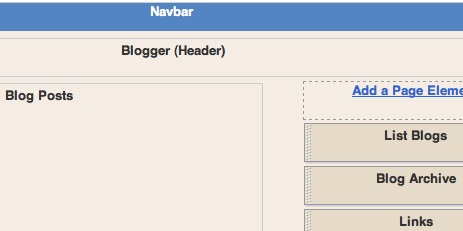
Blogger's Layout feature is an easy-to-use template editing feature that allows you to edit and customize your Blogger template without any knowledge of HTML or CSS. You can easily edit and customize the colors, fonts, header and sidebar of your blog with a few clicks of the mouse. To customize your blog's layout, go to the Layout | Page Elements tab in Blogger.

If you're using a classic template and would like to use the Layout feature, you can read instructions on how to switch.
If you're using a classic template and would like to use the Layout feature, you can read instructions on how to switch.
Moving elements in your template
How to arrange elements in your template
You can arrange the elements in your template the way you want them displayed. Simply click on the element you'd like to move and drag and drop it where you want it to be. You can move your page elements to the bottom of the page, anywhere in your sidebar, or below or above your blog posts. (Note: you can move all elements except your navbar, blog posts and header in some templates.)Editing elements in your template
Here's an overview of what you can configure when you click Edit for each of these elements:- Navbar: Select the color you'd like your Navbar to be.
- Header: Add or edit the header of your blog, which includes your blog title and blog description.
- Blog posts: Choose the number of posts to display on your main page. You can choose either the number of days with posts to display or the total number of posts on the main page. You also have the option to show email post links that let your visitors easily email posts from your blog to their friends.
- Profile: Edit/add your profile title, 'About Me' description, and location.
- Blog archive: Edit/add your blog archive title, select your display style (hierarchy, flat list or dropdown menu), choose to display post titles, display oldest posts first, choose your archive frequency (monthly, weekly or daily) and date format.
How to add a page element
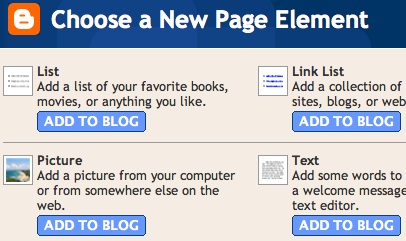
You can add several page elements to your blog page or sidebar by clicking Add a Page Element. This will open a pop-up window. Click Add to Blog in the proper element section to add it: - List: Add a list with the ability to add a title, select the number of items to display, sort your list alphabetically and add links to your list elements.
- Link List: Add a link list to your blog with the ability to add a link list title, select the number of items to display and sort your link list alphabetically.
- Labels: Add a list of all the labels you've used on your posts. Click each link to see a page showing all the posts with that label. You can change the title of the list, and sort it alphabetically or by frequency of use.
- Picture: Add a picture from your computer or the web. You can also add a title and caption to your picture and shrink the picture to fit into your blog perfectly.
- Text: Add text to your blog (such as a welcome message or footnote) with our rich text editor.
- HTML/JavaScript: Add third-party functionality or other HTML/JavaScript code to your blog.
- Feed: Add content from a site feed. Enter the feed URL, then click Continue. You'll then be able to add a title, select the number of items to show (up to five) and display the item dates and/or authors by selecting the appropriate check boxes.
- Logo: Add one of our stylish Blogger logos to your blog.
If You Like It ! Share It :)
Label: blogger tips, blogspot
# diposting oleh Full Blogging Trick and Tips : Sabtu, Oktober 30, 2010


Berlangganan Postingan [Atom]
Posting Komentar